

Product feed optimization used to be a topic reserved for PPC (Product Listing Ads) and Shopping campaign specialists.
Today, it’s quietly becoming one of the most important levers for SEO, Free Listings, and AI-driven product discovery across Google and LLMs like ChatGPT.
If your feeds are still treated as “just an ads input”, you’re probably leaving organic visibility and revenue on the table.
Product feed optimization is the process of improving the quality, structure, and relevance of your product data so Google and AI systems can understand, rank, and surface your products more often. Historically it focused on paid Shopping performance, but with Free Listings and Generative Engine Optimization (GEO), feeds have become a core SEO asset as well. The biggest wins come from fixing eligibility issues, enriching key attributes (titles, descriptions, categories, identifiers), and aligning feeds with real user search intent instead of only campaign structures. SharpFeed helps you audit your feeds, find high-impact SEO opportunities, and generate AI-optimized full feeds or supplemental feeds for Google Merchant Center in minutes.
What is product feed optimization?
A product feed is the structured file (CSV, TXT, XML, API) that describes your products: titles, descriptions, prices, images, availability, categories, identifiers and more. It powers Google Merchant Center, marketplaces, comparison engines, and increasingly AI search and shopping experiences.
Product feed optimization means systematically improving that data so it is:
- Complete: required and recommended attributes are filled correctly.
- Accurate: prices, URLs, stock and content match your website.
- Readable and relevant: titles and descriptions match search intent and are easy to understand.
- Well-structured: categories, product types and identifiers help Google understand what you sell.
If you want a refresher on how feeds fit inside Merchant Center, you can start with the Beginner’s Guide to Merchant Center and Google Shopping Feed Optimization, then come back here for a deeper optimization framework.
For a complete list of attributes and their requirements, you can also browse SharpFeed’s documentation.
From SEA-only lever to SEO and GEO discovery channel
For years, most teams optimized product feeds mainly for Shopping Ads:
- Tight titles focused on CTR for ads.
- Structures built around campaign segmentation.
- Changes prioritized by ROAS and bidding strategies.
That’s still important. But two big shifts have changed the game:
- Google Free Listings: product grids and units that appear in Google Search, the Shopping tab, Images, Maps, YouTube, Lens, Gemini and more, without media spend.
- Generative Engine Optimization (GEO) and AI assistants: product data increasingly powers AI overviews and shopping experiences (including ChatGPT-style flows), where structured feeds become the source of truth.
In this new context, feed optimization is no longer only about “feeding” campaigns. It becomes:
- A technical + content SEO layer for products.
- A way to increase organic coverage and relevance for long-tail queries.
- A foundation for how AI models understand your catalog.
This is why SEO teams need to co-own product feeds alongside performance marketing and merchandising. Treating feeds as an SEO asset is now a competitive advantage, not a nice-to-have.
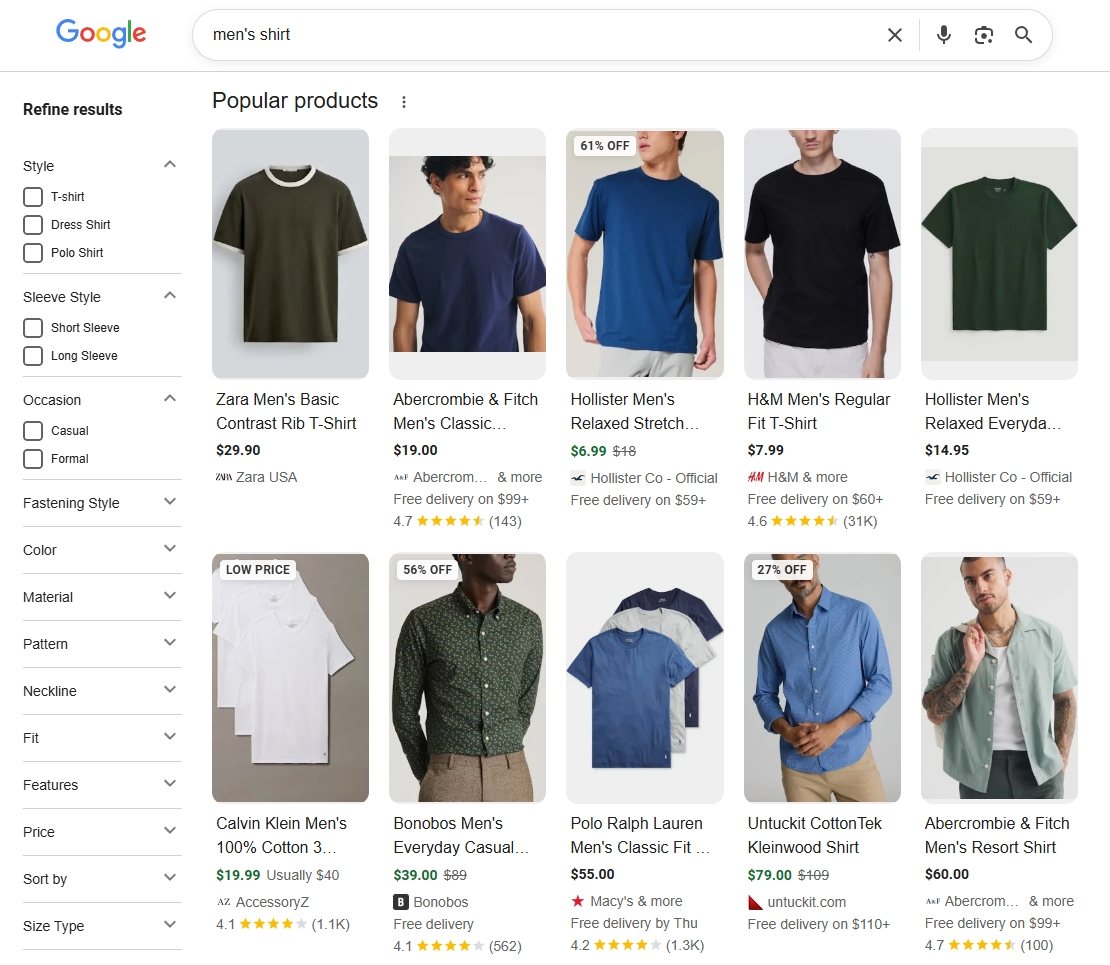
Free Listings product grids, increasingly present in Google SERPs
The core feed attributs of an optimized product feed
Let’s look at the core fields that matter most for SEO, Free Listings and GEO. You can click through to SharpFeed’s documentation for field-level details:
| Field | Role | SEO / Organic Optimization Tips |
|---|---|---|
id | Unique product identifier | Keep it stable and unique. Don’t recycle IDs across products; it breaks history and makes diagnosis harder. |
title | Main product name | Include brand, key attributes (model, color, material, size), and search terms people actually use. Front load the most important information, because titles are often truncated, and avoid keyword stuffing so everything stays clear and readable. |
description | Full product description | Write natural, benefit-focused copy. Answer common questions, include differentiators, and stay consistent with the landing page content, using relevant keywords in a way that still reads naturally. |
link | Product URL | Point to the most relevant landing page (correct variant when possible). Ensure fast loading and no redirect chains. |
image_link | Main product image | Use clear, high-resolution images that match the product exactly. Avoid watermarks, heavy overlays or misleading visuals. |
additional_image_link | Extra images | Add lifestyle or detail shots to help users and algorithms better understand the product. Useful for complex or visually driven items. |
price | Product price | Keep it synchronized with your website (currency, tax rules, discounts). Mismatches can hurt trust and eligibility. |
availability | Stock status | Use accurate values (in_stock, out_of_stock, preorder) and update frequently. Inaccurate availability reduces impressions and user trust. |
google_product_category | Google taxonomy category | Map products as precisely as possible; avoid generic or overly broad categories. Aim for categories that are at least two to three levels deep so Google understands relevance and intent. |
product_type | Your own categorization | Build a logical, keyword-informed hierarchy (e.g. Home > Furniture > Office Chairs). It can be used for both campaign structure and organic matching, especially when filters are applied. |
brand | Brand name | Always include a consistent brand for branded products. This improves matching, especially when users search by brand. |
gtin | Global Trade Item Number | Provide GTIN whenever available. It strongly helps Google match your product with known items and comparable offers, which often results in more eligible impressions and clicks. |
mpn | Manufacturer part number | Use when GTIN isn’t available. Keep values standardized and consistent with your website and manufacturer data. |
product_highlight | Bullet-style key benefits | Summarize 3–10 main benefits or features. This helps both users and algorithms quickly decode what matters. |
The more complete, consistent, and readable these elements are, the more likely your products are to appear and perform in organic placements.
Product feed optimization for SEO vs paid campaigns
Paid Shopping campaigns and SEO/Free Listings share the same underlying product data, but they don’t always have the same priorities.
Here’s a simplified comparison:
| Dimension | Paid Shopping focus | SEO / Free Listings / GEO focus |
|---|---|---|
| Objective | Maximize ROAS, control bids and traffic volume. | Maximize coverage, relevance and long-term organic visibility. |
| Risk tolerance | Low, because aggressive changes can break campaigns or bidding logic. | Higher, because you can test richer titles, categories and attributes on subsets of products. |
| Title strategy | Shorter, more commercial, tuned to ad performance. | More descriptive, intent-aligned, helpful to users and AI models. |
| Category structure | Often driven by campaign/Smart Shopping/PMAX structure. | Driven by how users search and how Google understands product relationships. |
| Update frequency | Tied to promotions, seasonality and bid strategies. | Ongoing iterations based on diagnostics, Free Listings performance and SEO learnings. |
Why paid-only optimization isn’t enough for SEO:
- Titles that are great for ads (short, aggressive) may be too vague for organic queries.
- Ignoring optional attributes (like
product_highlightor additional images) leaves relevance and CTR on the table. - Over-optimized campaign structures can conflict with what’s best for long-tail organic discovery.
The solution is not to “break” your paid setup, but to add an SEO/Free Listings layer on top, often using a combination of a dedicated organic feed and supplemental feeds. You can learn more about that approach in the Supplemental Feeds guide.
Step-by-step: how to optimize your product feed for organic performance
1. Audit your current product feed
Start by getting a clear picture of where you stand:
- Check Google Merchant Center Diagnostics for errors and warnings.
- Look at Free Listings performance: which products get impressions and clicks, which don’t.
- Identify missing or weak attributes: titles, descriptions, categories, identifiers, images.
- Spot inconsistent URLs, broken links, and mismatched prices or availability.
This is where SharpFeed is built to help:
- Upload your feed (CSV, TXT, XML or URL) into SharpFeed.
- Run a full feed audit that highlights missing fields, invalid formats, broken links, thin content and more.
- Get a clear, prioritized view of what’s blocking visibility vs what’s an opportunity to improve.
You can explore how SharpFeed audit the feed and other features here.
2. Fix blocking errors and eligibility issues first
Before trying to optimize for SEO, you need your products to be eligible at all.
Focus on:
- Required fields like
id,title,description,link,image_link,price,availability. - Critical identifiers such as
gtin,brand,mpnwhen applicable. - Policy-related issues (mismatched prices, untrustworthy landing pages, restricted products).
Use Merchant Center diagnostics together with SharpFeed’s audit to:
- Fix format errors and missing values in bulk.
- Correct URLs pointing to 404s or irrelevant pages.
- Align prices and availability with your website.
This alone can unlock a surprising amount of visibility in Free Listings.
3. Enrich key attributes for SEO
Once your feed is clean and eligible, you can start treating it as a content layer for your products.
Prioritize:
title: include brand, audience, product type and core attributes, and weave in main query patterns. Put the most important information first so that even if the title is cut after fifty to seventy characters, shoppers and Google still understand what the product is. Keep it user centric and do not turn it into a keyword list.description: expand into natural, benefit-driven copy that answers “who is this for?”, “what problem does it solve?”, and “what is unique about it”. Use concrete details such as materials, use cases and important specs so the text helps both users and matching algorithms.product_typeandgoogle_product_category: refine categorization so Google understands context and relationships. Avoid top level buckets when more specific options exist, and keep your own hierarchy close to how people browse your site.product_highlight: This one is way underrated! Add short bullets summarizing key selling points such as materials, use cases, guarantees and key specs. Think of these as the skimmable version of your description.additional_image_link: add more visuals where they truly inform the user, such as back views, detail close ups, lifestyle shots or size comparisons to boost CTR and trigger image carrousel.
For identifiers like gtin, brand and mpn, the goal is to be complete and precise. When these fields are missing, Google has a harder time grouping your products with comparable offers, which often means fewer impressions and less competitive placements even if everything else looks good.
For image related attributes, you can use a simple quality checklist:
- Choose clear, high resolution images that still load quickly on mobile.
- Show the actual product being sold on a clean, distraction free background for the main image.
- Avoid watermarks, heavy text overlays or promotional badges in images used for Google Merchant Center feeds.
- Use additional images to show scale, important details and real world context rather than near duplicates of the main view.
SharpFeed’s AI is designed to help here. Based on your existing feed and website content, it can:
- Suggest improved titles and descriptions aligned with SEO best practices.
- Generate product highlights that stay on-brand and focused on user value.
- Propose more precise categories and product types for better matching.
You decide the fields you want to optimize and keep full control over what gets exported.
4. Ensure URL, image and content consistency
Even a beautifully written title won’t save a product if the underlying technical signals are wrong.
Check that:
- Product URLs return HTTP 200 (no 404, 500 or infinite redirects).
- Landing page content matches the feed (price, availability, variant, images).
- Images load quickly, display properly on mobile, and match the product variant.
- The same product isn’t duplicated with conflicting IDs or URLs.
SharpFeed’s audit checks for:
- Dead links and non-200 status codes.
- Image issues (missing, invalid formats).
- Obvious mismatches between key attributes that can hurt trust and eligibility.
Cleaning this up improves both user experience and Google’s trust in your data.
5. Deploy changes safely with supplemental feeds
If you’re using Google Merchant Center, you don’t always have to edit your primary feed directly to optimize for SEO.
A powerful pattern is to:
- Keep a stable primary feed for paid campaigns.
- Use supplemental feeds to:
- Test new titles and descriptions for Free Listings.
- Add or improve categories and product highlights.
- Enrich only a subset of products (e.g. top categories or strategic brands).
This “two-feed strategy” lets you push organic improvements without disrupting existing campaign setups. For a detailed walkthrough, you can read:
Supplemental Feeds for Google Merchant Center: What are They and How to Use Them.
SharpFeed can generate:
- A full optimized feed to replace or update your primary source.
- A lean supplemental feed containing only
idplus the attributes you want to override, ready to upload into Merchant Center.
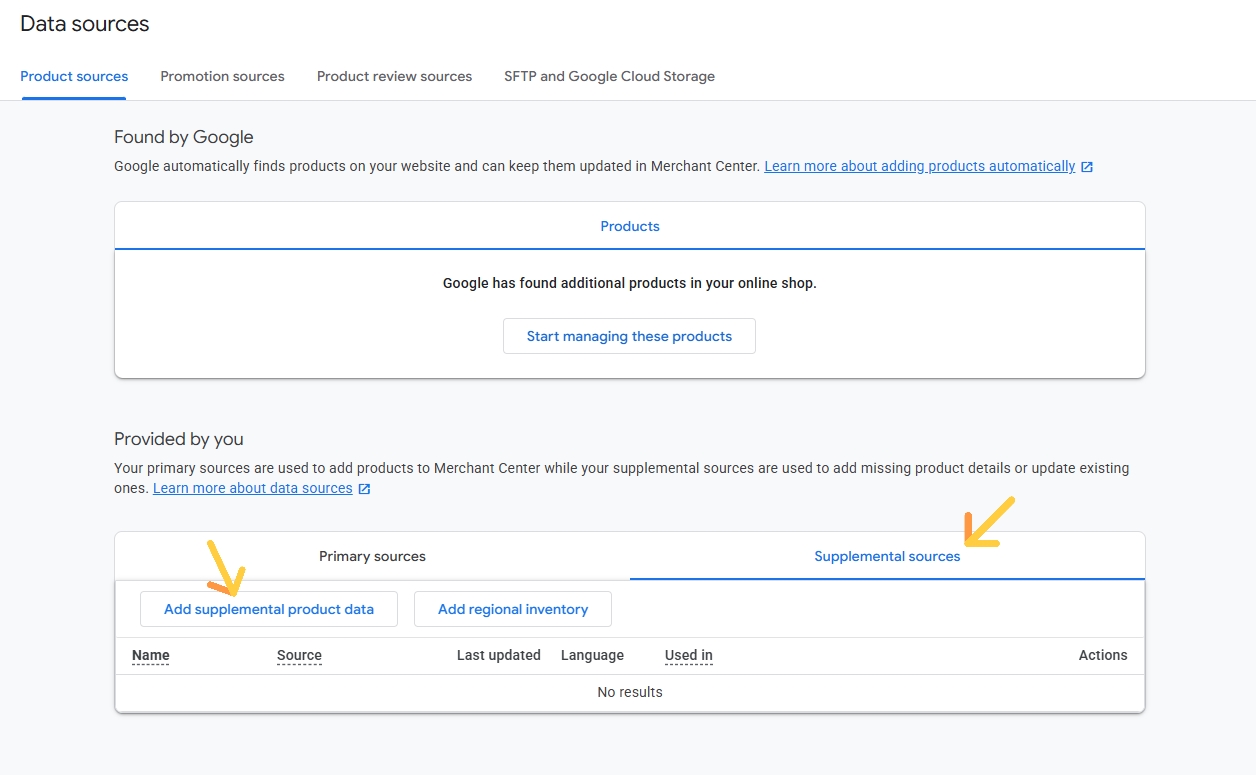
How to add a supplemental source in GMC
6. Monitor Free Listings and GEO performance over time
Feed optimization is not a one-off project; it’s an ongoing SEO topic.
On a recurring basis:
- Review Free Listings reports in Merchant Center (impressions, clicks by product or category).
- Identify patterns: which titles, attributes or categories correlate with better performance.
- Iterate on underperforming segments with new titles, highlights or categories.
- Log changes so you know which optimizations drove which results.
Within SharpFeed, you can re-run audits and export updated patches as your catalog, priorities and market conditions evolve.
How SharpFeed helps you optimize your product feeds for SEO and ChatGPT
SharpFeed is built specifically for SEOs who want to treat product feeds as a growth channel, not just something for the PPC team.
Here’s how it fits into your workflow:
-
Import your feed in seconds
Upload your feed in CSV, TXT or XML, or import it via URL. SharpFeed works with Google Merchant Center-style feeds and other standard formats that usually comes from feed management platforms like Channable or Lengow. -
Get a full feed audit
SharpFeed scans your data to surface:- Missing or invalid fields.
- Weak titles and descriptions.
- Missing identifiers (brand, GTIN, MPN).
- Image issues and broken product or image links.
- Formatting and compliance errors that block eligibility.
-
Use AI to optimize key attributes
With SharpFeed AI, you can:- Generate better titles and descriptions aligned with SEO best practices.
- Enrich highlights and categories for Free Listings and GEO.
- Respect your brand tone while improving clarity and relevance.
-
Export an optimized feed or supplemental files
When you’re ready, export:- A complete optimized feed ready to use as your new primary source.
- One or several supplemental feeds tailored to specific goals (e.g. SEO titles, missing identifiers, promo pricing).
You can see a walkthrough of these capabilities on the SharpFeed AI page.
Product feeds, SEO and Generative Engine Optimization (GEO)
Generative search experiences (like AI overviews in Google or ChatGPT-based shopping flows) don’t read your site the way a human does. They rely heavily on structured, machine-readable data to:
- Understand what your products are.
- Compare them with alternatives.
- Decide which items to surface in answers.
That makes your product feed a direct input into GEO in two complementary ways:
-
Google first, then ChatGPT by “halo effect”
Today, a large majority of product carousels (up to 83%) in ChatGPT Shopping are powered by the same underlying Google product grids and Free Listings results. In practice, when you improve your organic product visibility on Google by optimizing your Merchant Center feed, you also improve your chances of being selected as one of the products surfaced in ChatGPT’s shopping experiences. Getting the basics right for Google (titles, identifiers, categories, availability, pricing) is already a way to influence how LLMs discover and compare your products. -
Native ChatGPT product feeds and OpenAI’s own spec
In parallel, OpenAI has introduced its own Product Feed Specification so merchants can plug catalogs directly into ChatGPT. This spec overlaps with Google’s logic but also introduces AI-native controls, such as explicit eligibility flags (non exhaustive list):Attribute Role in ChatGPT Shopping Why it matters for GEO is_eligible_searchControls whether a product can appear in ChatGPT search results. Acts like an on/off switch for AI discovery; if it is false or missing, the product effectively does not exist for ChatGPT. is_eligible_checkoutControls whether users can purchase directly inside ChatGPT. Enables full agentic commerce flows, which requires stricter trust, policy and data quality conditions. item_idCanonical product identifier in OpenAI feeds. Replaces Google’s idand must remain stable so the AI layer can track and update products reliably.image_urlMain product image URL. Replaces image_linkand is required for visual product understanding in ChatGPT’s UI.target_countries/store_countryGeographic targeting and store location. Ensure that ChatGPT only shows products to users in supported markets with the right price and availability. In early 2026, OpenAI rolled out a significant update to this spec (new fields, stricter validations, and hard renames such as
id→item_idandlink→url). You can find a detailed breakdown in our dedicated article on the OpenAI product feed update. SharpFeed’s auditing engine is already aligned with this new version so you can validate and optimize feeds for both Google Merchant Center and ChatGPT Commerce from the same place.
Investing in product feed optimization today is a way to future-proof your organic visibility in AI-first interfaces, not just in classic Google Shopping grids. The same disciplined work on structure, completeness and eligibility that lifts your Free Listings will also prepare your catalog for native LLM integrations as they roll out in more markets.
Common mistakes to avoid in product feed optimization
Even teams that care about feeds often fall into a few predictable traps. Watching out for them will keep your work aligned with both users and Google.
- Relying only on internal product names: titles that mirror back office labels or SKU codes rarely match what shoppers actually search for.
- Treating images as an afterthought: low quality or generic visuals make otherwise strong products invisible in busy grids.
- Leaving identifiers and categories incomplete: missing GTIN, brand or vague categories make it harder for Google to understand and surface your items.
- Allowing price and availability to drift out of sync: mismatches between feed and site frustrate users and quickly trigger Merchant Center issues.
- Setting and forgetting the feed: catalogs, search behavior and competition evolve, so a feed that worked last year can quietly lose ground if you never audit or iterate on it.
Avoiding these mistakes turns product feed optimization into a reliable, compounding SEO lever instead of a one time cleanup.
FAQ: product feed optimization for SEO
What is product feed optimization?
Product feed optimization is the process of improving the data in your product feed so that Google and other platforms can better understand, match and present your products. It combines data quality (no errors, complete attributes) with content work (better titles, descriptions, categories and images) so your products are more eligible, more relevant and more attractive in both paid and organic placements.
How do you optimize a product feed?
A practical way to optimize a feed is to follow a simple loop: audit → fix eligibility issues → enrich key attributes → deploy changes safely → measure and repeat. In concrete terms that means checking diagnostics, fixing required fields and identifiers, improving titles, descriptions, categories and images, rolling out the changes through your primary or supplemental feeds, then tracking Free Listings and campaign performance so you can keep iterating.
What are 5 key fields to optimize in a Merchant Center product feed?
If you need a short starting list, focus on these five fields first:
titlefor clear, intent aligned product names.descriptionfor detailed, benefit driven copy.image_linkfor high quality main visuals.google_product_categoryfor precise classification in Google’s taxonomy.gtin(ormpn+brand) so Google can reliably identify and group your products.
Once those are solid, you can expand to attributes like price, availability, product_type, and product_highlight.
What tools do you use for product feed optimization?
At the core you need Google Merchant Center for diagnostics and feed delivery, plus a way to edit and enrich your data efficiently. SharpFeed is designed to be that optimization layer: it audits your feed for missing or weak attributes, checks links and formats, and uses AI to generate better titles, descriptions, highlights and categories. You can then export either a complete optimized feed or targeted supplemental feeds, and continue managing campaigns in Google Ads or your usual ad stack on top of that.
Is product feed optimization only for advertisers?
Feed optimization started as a paid media topic, but with Free Listings and AI search experiences, it is now equally (if not more) important for SEO and organic performance. Even if you never run Shopping Ads, a clean, optimized feed can drive incremental visibility and revenue.
How often should I update my product feed for SEO?
At minimum, update your feed whenever prices, stock or product content change. For SEO and GEO, review performance and run a structured optimization cycle (audit → improve → deploy → measure) every few weeks or months depending on catalog size and seasonality.
Do I need developers to optimize my feed?
You might need technical help to set up exports or connect systems, but many high-impact optimizations (titles, descriptions, categories, identifiers) can be done by SEO and marketing teams using tools like SharpFeed and supplemental feeds in Merchant Center.
What’s the difference between schema markup and product feed optimization?
Schema markup (structured data on your website) helps search engines understand individual pages. Product feeds describe your entire catalog in a structured file. For commerce SEO, you ideally want both: clean on-site schema and an optimized product feed working together.
Can I start with a small subset of products?
Yes, and it’s often the best approach. Start with a strategic category or top 10–20% of products, use SharpFeed to audit and enrich them, deploy changes via a supplemental feed, then measure the impact in Free Listings before scaling to the rest of the catalog.
Is PPC better than SEO for product feeds?
Neither channel is universally “better”; they play different roles that should work together. Paid Shopping and Performance Max give you fast, controllable traffic as long as you keep bidding, while SEO and Free Listings build more durable, incremental visibility over time. A strong product feed supports both at once, so the goal is usually to use PPC for scale and control while using feed optimization and Free Listings to grow your organic share and reduce dependence on ad spend.
What are the 5 steps of optimization for a product feed?
You can think of feed optimization as five repeating steps:
- Audit your current feed to uncover errors, gaps and missed opportunities.
- Clean and fix required fields and identifiers so all eligible products can show.
- Enrich high impact attributes like titles, descriptions, categories and images.
- Deploy your changes via primary or supplemental feeds in Google Merchant Center.
- Measure and iterate using Free Listings and campaign performance reports, then feed those learnings back into the next audit.
Final takeaway: Feeds are now a core SEO asset
Product feed optimization is no longer just a technical prerequisite for Shopping Ads; it’s becoming a core pillar of e-commerce SEO and GEO. Brands that treat feeds as a living content and data layer, not just a static export, will win more visibility across Google and AI-powered shopping experiences.
By combining clean, complete data with SEO-focused enrichment and safe deployment patterns (like supplemental feeds), you can grow organic revenue without jeopardizing paid performance.
SharpFeed is designed to make that process fast, controlled and scalable, from deep audits to AI-powered optimization and export-ready files.