

Google Merchant Center Supplemental Feeds (Supplemental Sources): The Complete Guide
Supplemental feeds, now commonly called supplemental data sources or supplemental sources, let you add or override attributes on top of your primary product feed in Google Merchant Center (GMC), without touching your original feed. They’re one of the fastest ways to fix missing data (like GTIN/brand), run promotions (sale_price + effective dates), test better titles for organic visibility, or resolve feed issues without waiting on dev, PIM, or ecommerce platform updates.
In this guide, you’ll learn exactly how supplemental sources work, when to use them (and when not to), how to set them up, and how SharpFeed helps you generate a clean, ready-to-upload supplemental feed in minutes.
What is a supplemental feed (or supplemental source) in Google Merchant Center?
A supplemental feed is a secondary file (or API/Sheet source) that enhances your primary product data source in Google Merchant Center.
It can:
- Add missing attributes (e.g.,
gtin,brand,shipping,product_highlight) - Override existing values (e.g.,
title,sale_price,image_link) - Fix specific errors Merchant Center reports, without regenerating your entire primary feed
It cannot replace your primary feed. Your primary feed remains the foundation, and the supplemental source acts like a layer applied on top.
Supplemental feeds vs primary feeds
- Primary feed: Creates and defines your products in Merchant Center (the “source of truth” baseline).
- Supplemental feed: Only updates products that already exist in the primary feed (by matching
id).
Why supplemental sources matter for SEO and Free Listings
Free Listings is a Google Shopping feature that can drive organic product visibility on Google results pages without ad spend. But organic exposure is extremely sensitive to data quality and this happen in your product feed.
Supplemental sources are valuable because they let you:
- Improve relevance (better titles, richer descriptions, clearer attributes)
- Increase eligibility (fill missing identifiers like
gtinandbrand) - Fix blockers fast (Like Merchant Center errors, missing required fields)
- Run controlled experiments (test a subset of products without changing the full catalog)
When the goal is to better rank or rank more products organically, you often need a way to improve the feed without risking paid campaign stability or waiting on your ecommerce stack. The supplemental feeds are the solution and will help you optimize your SEO strategy.
How supplemental feeds work
Google Merchant Center merges your supplemental source into your primary data source by product id.
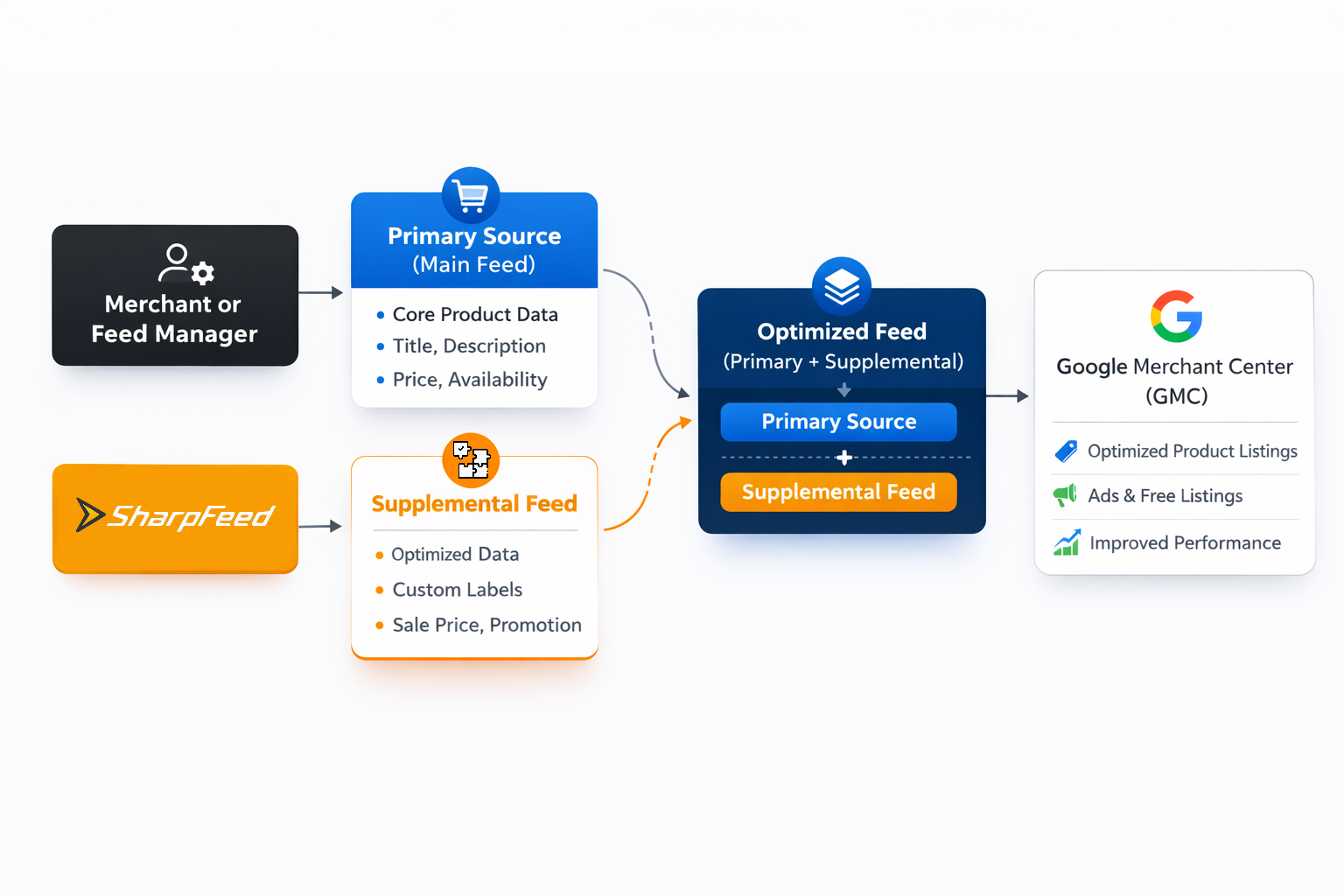
Data flow visualization of how supplemental feeds works
The one rule you must respect
Your supplemental feed must include:
id(required)- Any attributes you want to add/override (optional)
If a row in the supplemental feed contains an id that doesn’t exist in your primary feed, it won’t apply to anything.
What actually gets updated?
For each matching id, Merchant Center takes your primary product data and then applies the supplemental attributes on top.
Think of it like:
- Primary feed defines the product
- Supplemental feed patches the product
When should you use a supplemental feed?
You can use them for many things. But they are best to build a strong organic strategy for free listings. Here are the highest-ROI scenarios where a supplemental source is usually the best and fastest solution.
1) Your titles or product categorization are missing, weak or not relevant (and you want to rank better in free listings)
This is where SharpFeed gives you optimized supplemental feeds for:
This is one of the simplest and most effective organic performance levers because titles and categorization strongly influence organic performance.
2) You want richer listings with optimized key product attributs (highlights, extra images, better descriptions)
SharpFeed also help you here to add or enhance:
description(more complete and useful content)product_highlight(bullet-style key benefits)additional_image_link/additional_image_urls
These are the second most strategic fields and attributs to optimized for free listings performance.
3) You need rapid pricing updates or promotions
Use a supplemental feed to push:
sale_pricesale_price_effective_date- (sometimes)
priceupdates when your primary feed update cycle is slow
Typical use case: flash sales, seasonal promos, daily pricing, clearance events.
4) You’re missing critical identifiers (and losing visibility)
Fix missing:
gtinbrandmpn(when GTIN is not available)
This can improve classification and eligibility, especially in competitive categories.
5) Your organization can’t easily change the primary feed
This is common when the primary feed is generated by:
- a PIM (Product Information Management) system
- ERP exports
- dev-controlled pipelines
- marketplace integrators
Supplemental feeds let marketing/SEO teams move faster without breaking upstream systems.
When you should NOT use a supplemental feed
Supplemental sources are powerful, but they’re not a cure-all.
Avoid using them when:
- You’re trying to create / add new products to your feed (supplemental feeds can’t do that)
- Your data is constantly changing and you need a real-time system (API-based updates may be better)
- You’re overriding accurate data with stale values (common mistake with pricing, availability, shipping)
- You don’t have stable, consistent
idvalues (merge will fail or apply incorrectly)
Step-by-step: How to set up a supplemental source in Google Merchant Center
The interface changes over time, but the workflow usually looks like this:
- In the side panel, go to Merchant Center → Data sources
- Supplemental source tab / Add supplemental product data
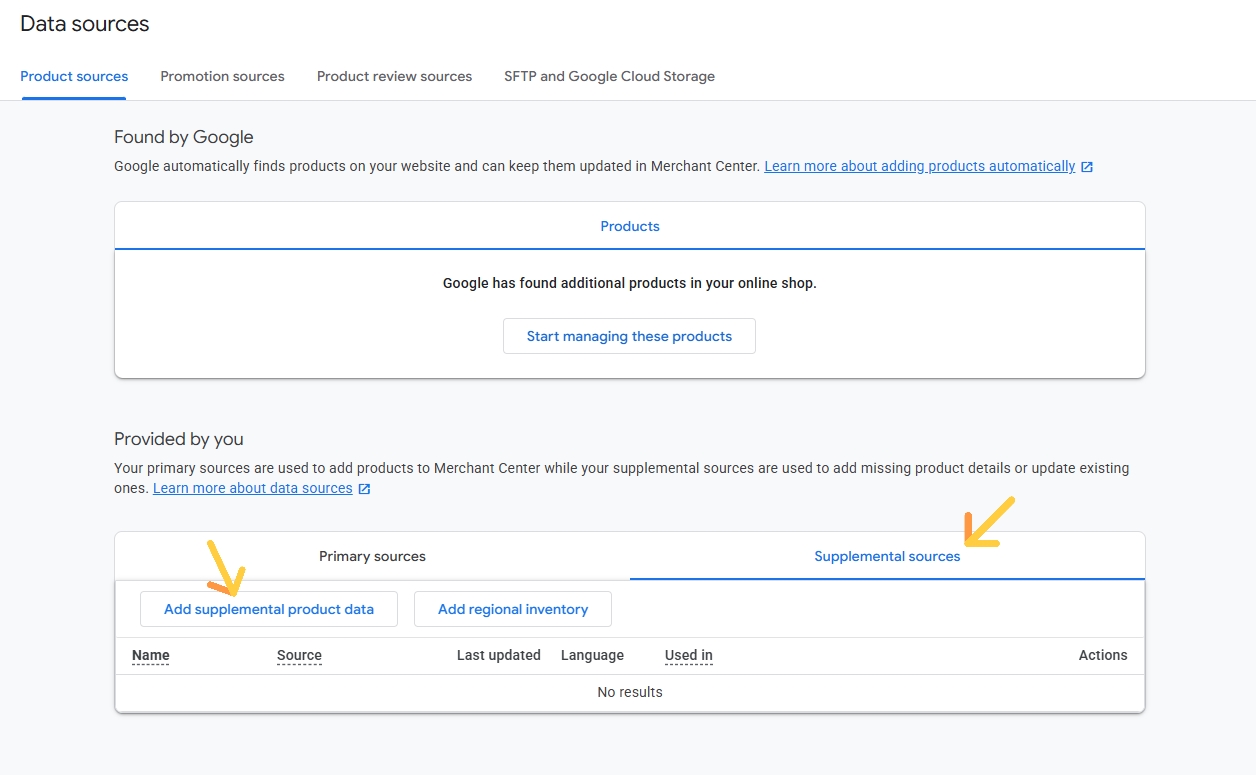
How to add a supplemental source in GMC
- Choose the input method:
- File upload (TXT/XML/TSV)
- Google Sheets
- Content API (automated)
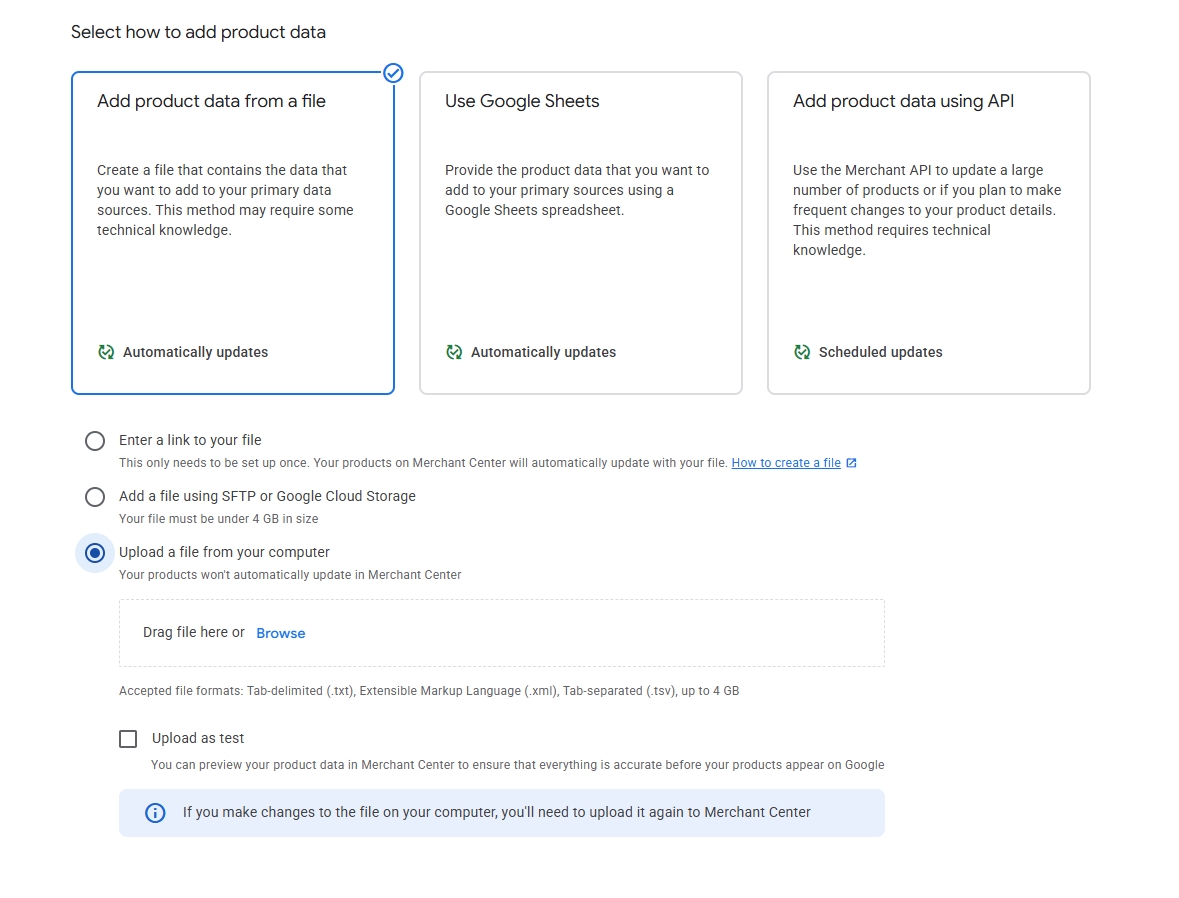
You can add your supplemental source as link or a file from your computer (.txt, .xml, .tsv)
SharpFeed provides both.
- Configure:
- Name
- Language / feed label (if applicable)
- Link it to your primary data source
- Upload and validate
The minimum column set your supplemental file needs
At minimum:
id
Then include only what you want to update, for example:
id, titleid, descriptionid, sale_price, sale_price_effective_dateid, brand, gtinid, product_highlight
That’s it. Keep it minimal and intentional.
Best practices for supplemental sources
Keep your id stable and unique
- Your supplemental source is only as good as your product identifiers.
- Never “recycle” IDs across different products.
Only override what you truly want to change
Supplemental feeds are best when they are surgical, they are not meant to be a complete new feed.
A good rule:
- One supplemental = one purpose
- Title optimization feed
- Description optimization feed
- Key attributes enrichment
- Promo pricing feed
- Missing identifiers feed
Add a versioning habit (you’ll thank yourself later)
- Store your supplemental files in Git, Drive with version names, or your internal system.
- Use timestamps in filenames (e.g.,
promo_sale_prices_2026-03-01.csv).
Validate against Merchant Center diagnostics
After upload:
- Check Diagnostics
- Check Performance → Free Listings
- Confirm your attributes actually applied (spot-check by product ID)
Don’t “paper over” policy problems
Supplemental feeds can fix data issues, but they won’t protect you from:
- mismatched landing page content
- misleading titles
- restricted products/policy violations
Common supplemental feed examples
| Use Case | Columns | Why It Works |
|---|---|---|
| Optimized SEO-focused titles for organic visibility | idtitle | Lets you run optimized title to boost free listings performance. |
| Adding product highlights or enrich key attributs | idproduct_highlight | Makes products more relevant for both user and Google. it can also lift click-through rate. |
| Adding sale prices for a promotion | idsale_pricesale_price_effective_date | Fast promo deployment without touching primary feed exports. |
| Fixing missing brand + GTIN in bulk | idbrandgtin | Improves eligibility and helps Google classify products correctly. |
The “two-feed strategy” to boost Free Listings and keep paid Shopping stable
For teams that treat Free Listings as a true SEO channel (and not just an extension of paid) separating workflows becomes a strategic decision. Organic product visibility deserves its own optimization logic, and SEO teams should own product feeds more than ever instead of relying entirely on paid-driven structures. Here’s what you can do:
- Primary feed A (kept) : optimized and stable for paid Shopping campaigns
- Primary feed B (copy): dedicated to Free Listings (organic visibility)
Then:
- Primary feed B + supplemental sources: You apply supplemental sources to feed B to aggressively optimize organic listings without disrupting paid setups.
This approach is especially helpful when you want to optimize faster for SEO, while keeping paid performance predictable. That way, you can easily optimize your product shopping feed for Google Merchant Center.
How SharpFeed helps you generate a clean and optimized supplemental feed
SharpFeed’s supplemental feed feature is built for your free listing SEO strategy with a fast and simple workflow:
First, you upload your primary product feed into SharpFeed. Within seconds, the platform runs a full audit and highlights what’s holding your visibility back: from missing attributes and compliance blockers to high-impact SEO opportunities, especially for Free Listings.
Next, you decide what field to improve. Maybe your titles need to be strengthened or your descriptions and highlights could be enriched to improve performance. Instead of modifying your entire feed, you simply choose the fields you want to optimize or add.
SharpFeed then generates a clean supplemental feed file for you. This file only includes the products that require updates and only the attributes you’ve chosen to override or add. It also contains a properly structured id column so everything merges correctly inside Google Merchant Center.
The result is essentially a lightweight “patch file” that you can upload directly as a supplemental source in Google Merchant Center. It’s fast to deploy, safe because it doesn’t overwrite your primary feed structure, and fully reversible if you need to roll back changes. (Note: you can also export the entire optimized feed to replace your primary source if you want)
FAQ: Supplemental feeds in Google Merchant Center
Do I still need a primary feed?
Yes. A supplemental source cannot replace a primary feed. It only updates products that already exist in the primary source.
Can I connect multiple supplemental sources to one primary feed?
Yes and this is common. For example you can have one supplemental source generated by SharpFeed to optimize you titles and another one to update your sale price during sales. Just avoid conflicting overrides (e.g., two supplementals both changing price).
Are supplemental sources only for Free Listings?
No. They can support both free and paid listings, because they change the underlying product data in Merchant Center. It is actually often use in paid strategies but not really well knowned in the SEO world. It’s time to step ahead and elevate your free listing strategy.
Does the attribute order in the file matter?
Not really, as long as:
- column headers match Google’s attribute names
idexists and matches your primary feed IDs
How do I verify if my supplemental feed worked?
- Spot-check products by ID to confirm attributes applied
- Merchant Center Diagnostics (errors fixed?)
- Merchant Center Performance (impressions/clicks improved?)
Simple supplemental feed checklist before adding it to your primary source
Final Takeaway: Supplemental sources are the fastest path to better product visibility and organic performance in free listings
Supplemental feeds are one of the most underused strategic SEO growth levers in Google Merchant Center.
While most competitors still rely solely on their primary feed and slow upstream changes, supplemental sources allow you to move faster, test smarter, and optimize continuously without disrupting your core data infrastructure.
They give you the flexibility to fix missing attributes, improve product titles and descriptions for organic visibility, and enrich listings for Google, all without rebuilding your entire feed.
For brands and agencies focused on Free Listings performance, this is a major competitive advantage. Very few players fully leverage supplemental feeds as part of their SEO strategy, which makes this the perfect moment to strengthen yours.
With SharpFeed, you can identify the highest-impact optimizations and generate clean, ready-to-upload supplemental files in minutes. Instead of fighting CSV exports or waiting on development cycles, you gain a fast, controlled, and scalable way to improve product visibility.