

SharpFeed Update: New AI Category Analysis for Optimized Shopping feeds
SharpFeed now helps you audit and fix Google Product Categories across your entire catalog. Upload your feed, preview a sample, then run a bulk analysis with optional filters. You get clear outcomes (correct, wrong, too broad, or not enough data), a relevance score, short explanations, and suggested category IDs when useful. Export a full optimized feed, a detailed analysis file, or a supplemental-style file with only the rows where the category changed—ideal for safe Merchant Center updates and organic performance.
What is a categorization for product feeds?
The google_product_category field is an optional attribute in your product feed. It tells Google which predefined category from the official Google product taxonomy best describes each item. You can send either a numeric category ID (for example 2271) or the full category path (for example Apparel & Accessories > Clothing > Dresses) but not both at once. If you leave it empty, Google will try to categorize the product automatically from your titles, descriptions, and other attributes; if you set it, you override that automatic categorization, which helps with Shopping relevance, category-specific rules (for example alcohol or gift cards), and campaign targeting. Your own shop navigation or internal taxonomy belongs in product_type but google_product_category is specifically for Google’s standardized taxonomy and can also be use for LLMs like ChatGPT.
Why product categorization matters for organic performance
Google Product Category is one of the strongest structured signals in your feed. It tells Google what family of products you are selling, how items relate to each other, and how they should compete in Shopping results. When categories are wrong, too generic, or missing, you are not just risking disapprovals, you are missing an impactful semantic optimization opportunity.
Better categorization usually helps you:
- Improve relevance and matching for the right queries
- Reduce wasted impressions on irrelevant searches
- Build a cleaner catalog structure for reporting and merchandising
- Keep Shopping, Free Listings, ChatGPT and other feed-driven experiences aligned with what you actually sell
Where most feeds go wrong (and why your feed management tool is not enough)
In practice, categorization breaks in predictable ways:
- Too broad : one parent category applied to an entire catalog because it was easy at setup
- Wrong branch : a plausible-sounding category that does not match the actual product
- Inherited mistakes : categories copied from an ecommerce platform mapping that was never validated
- Missing or inconsistent values : especially when exports come from multiple systems
Many feed management tools are excellent at moving data around. They are often weaker at semantic accuracy: they map fields, but they do not truly “understand” whether a dress belongs under the right apparel node, or whether accessories landed under electronics by mistake. The result is a feed that looks complete while still being systematically mislabeled.
That gap matters because Google and other channels do not read your intentions, they read your category attribute.
A Categorization Strategic for both Google and ChatGPT
Structured product data is no longer only a Google Merchant Center concern. Tools like ChatGPT Shopping and similar AI-assisted shopping experiences lean on the same kind of catalog signals: titles, descriptions, identifiers, and category context to decide what is relevant, comparable, and trustworthy.
If your categories are vague or wrong, you are not only diluting performance in classic Shopping. You are also giving weaker context to any system that tries to match your products to questions, comparisons, and intent-driven discovery. Fixing categorization is a durable upgrade: it improves clarity everywhere that feed data is consumed.
What SharpFeed’s AI Category Analysis does
SharpFeed compares each product’s Google Product Category (from google_product_category or product_category, including common column variants) against the official Google Product Taxonomy, numeric IDs and hierarchical labels. For every item you get:
- A relevance score
- A classification: correct, wrong, too broad, or not enough data
- A short reason you can act on
- When useful, a suggested better category ID so you can fix issues at scale
If the feed does not have a category field or if some value are missing for some products, SharpFeed will add the google_product_category field and assign a value when empty.
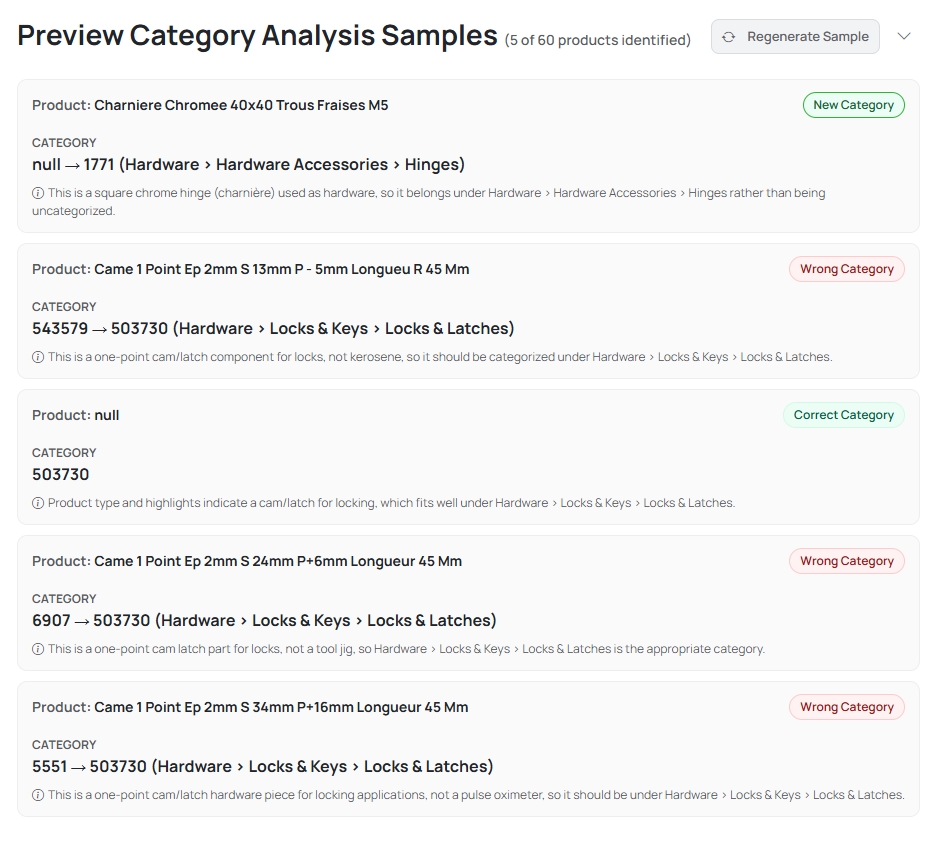
Here you can see how SharpFeed analyse your feed to optimize your categories
The goal is simple: make feed-wide categorization accurate enough for Google Shopping and clear enough to support better structure everywhere else you use the feed.
How you use it (simple end-to-end flow)
The flow matches SharpFeed’s other AI tools, no spreadsheet gymnastics required.
- Upload your feed : CSV, TXT, or XML, same as your usual workflow.
- Run a sample first : SharpFeed analyzes a small set of 5 products so you can see cards with the title, the original category (ID and readable path when known) the outcome, the reason, and a suggested category when applicable.
- Go bulk when you are ready : Optional filters help you focus: text in the title, and multi-select by category (including products that are not categorized).
After a bulk run, you get dashboard with KPIs by outcome and relevance framing so you can see whether the problem was a few bad branches or a systematic pattern.
Exports that match how merchants actually ship updates
When the run finishes, SharpFeed gives you practical files:
- Full optimized feed (CSV) : your feed with category columns updated where a better value applies
- Analysis CSV : one row per product with the detail you need to review decisions (scores, cases, original and new categories, reasons)
- Supplemental-style outputs (TSV / TXT / XML) : only rows where the category actually changed, so you can push incremental updates into Merchant Center without touching unaffected SKUs
That last option pairs naturally with a supplemental feed workflow: you keep your primary feed stable, upload a small “patch” source for category fixes, and let Merchant Center merge by product ID. It is one of the easiest ways to improve organic Shopping performance without a risky full-feed replace.
If you want a refresher on how supplemental feeds work, you can check what are supplemental feeds and how to use them.
FAQ
Does this replace manual category work entirely?
No. SharpFeed accelerates detection and suggests corrections, but you stay in control, especially for edge cases and proprietary assortments.
What if some products have no category yet?
The analysis can flag not enough data or help you add a sensible Google Product Category where one was missing, so you are not stuck with blank values in Merchant Center.
Will fixing categories affect only Google Shopping?
Google Shopping is the primary use case, but accurate categories also improve how clearly your catalog is described anywhere that reads your feed, including newer shopping and AI-driven discovery experiences like ChatGPT Shopping.
Is the supplemental export required?
No. You can download a full optimized feed if you prefer a single file. Many teams prefer supplemental-style files for safer, incremental updates.
Final takeaway
Category quality is one of the most under-invested levers in feed optimization. Most tools will happily ship a “complete” feed with categories that are technically present but strategically wrong. SharpFeed’s AI Category Analysis closes that gap with a clear score, a plain-language verdict, and export options that fit real Merchant Center workflows—including supplemental updates for organic performance.